
Download dbBee – Free Spreadsheet Publishing Tool, Online Database & Report Builder
Overview
dbBee is a web‑based utility that transforms traditional spreadsheet files into interactive, searchable, and embeddable online applications without requiring any coding knowledge. Whether you are a small business owner looking to share sales reports, a teacher wanting to publish grade sheets, or a developer seeking a quick admin interface for an internal database, dbBee offers a streamlined workflow that bridges the gap between static files and dynamic web content. The platform accepts common formats such as Microsoft Excel (.xls, .xlsx) and Access (.mdb) and instantly generates a live web page where users can filter, sort, and even edit data through built‑in forms.
One of the strongest points of dbBee is its emphasis on simplicity: after uploading a file, a wizard guides you through publishing options, access permissions, and embedding codes, all in a few clicks. Because the service is free, it becomes an attractive alternative to paid SaaS solutions that often lock you into subscription plans or complex licensing. Security is handled through HTTPS connections, and the generated pages can be password‑protected or restricted to specific domains.
In short, dbBee provides a flexible, secure, and cost‑effective way to bring spreadsheet data online, turning static tables into living, searchable resources that can be integrated directly into any website or intranet.
Features & Benefits
- Zero‑code publishing: Convert .xls, .xlsx, and .mdb files into searchable web pages without writing a single line of code.
- Custom search forms: Build instant search boxes, dropdown filters, and range selectors that work on any device.
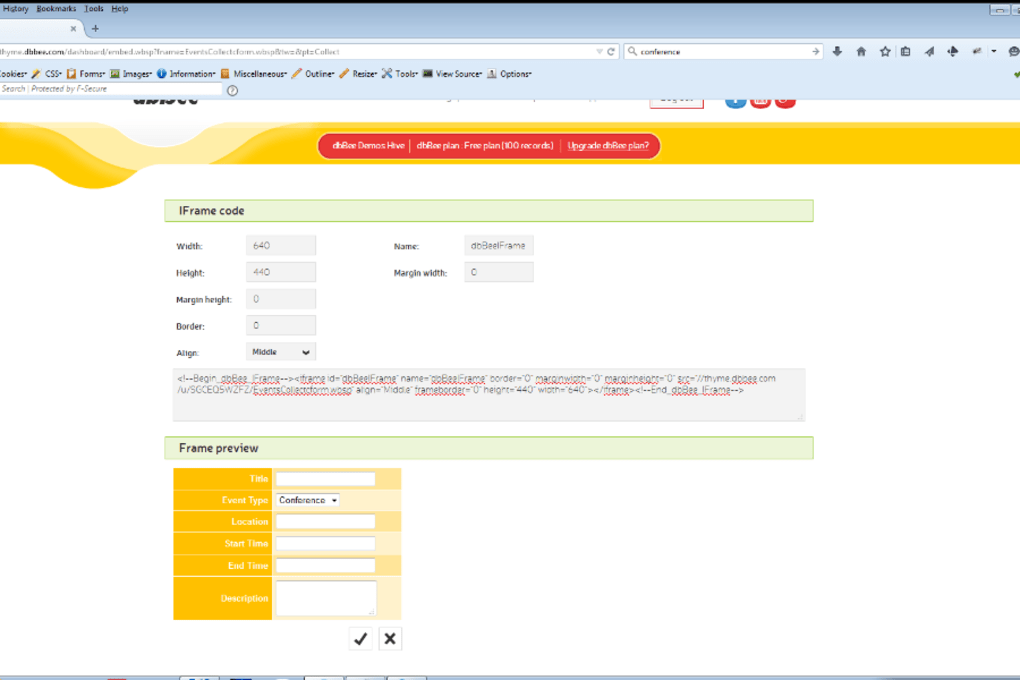
- Embedded reporting: Generate responsive reports that can be embedded into WordPress, Joomla, or custom HTML sites with a simple iframe snippet.
- Data administration: Create edit‑forms that allow authorized users to update records directly from the browser.
- Access control: Protect your projects with password protection, IP whitelisting, or domain‑based restrictions.
- Responsive design: All published tables automatically adapt to mobile, tablet, and desktop screens.
- Free tier: Full publishing capabilities are available at no cost, with optional premium upgrades for higher storage and custom branding.
- Secure connection: All data transmission occurs over HTTPS, ensuring that your information remains encrypted in transit.
- Version history: Keep track of changes to your uploaded files and revert to previous versions if needed.
- Multi‑language support: Interface available in several languages, making it accessible to a global audience.
Each feature is designed to reduce the time and effort traditionally required to move spreadsheet data onto the web. For example, the built‑in search forms eliminate the need for external plugins or JavaScript libraries, while the responsive layout guarantees a consistent experience for end‑users regardless of device. The ability to embed directly into existing sites means you can enrich your content without redesigning pages, and the free tier removes financial barriers for startups and hobbyists. Together, these capabilities turn dbBee into a versatile tool for publishing, collaborating, and maintaining data‑driven web content.
Installation, Usage & Compatibility
Getting started with dbBee is straightforward and does not involve a traditional installation process, because the service runs entirely in the cloud. To begin, visit the official website and create a free account using an email address or a single‑sign‑on option such as Google. After confirming your account, you will be taken to the dashboard where the “Upload Project” button awaits.
Click the button, select your spreadsheet or Access file, and let the platform process the data. The wizard will then ask you to define the primary table, choose columns to display, and set up any search filters you desire. Once the configuration is complete, dbBee generates a unique URL that points to your live web page.
You can test the page instantly, adjust settings, or copy the embed code for integration into your website.
Because dbBee is a web service, it works on any modern operating system that supports a standard web browser. The compatible platforms include Windows 10/11, macOS Monterey and later, Linux distributions with Chrome or Firefox, as well as mobile operating systems such as Android 8.0+ and iOS 13+. No additional plugins or extensions are required, and the service adheres to HTML5 standards, ensuring that the generated pages render correctly across browsers like Chrome, Edge, Safari, and Firefox. For users who prefer offline editing, you can continue to work on your original spreadsheet locally; when you are ready to publish an updated version, simply re‑upload the file through the dashboard. dbBee will automatically replace the previous version while preserving the existing URL and embed code, so your audience always sees the latest data without any broken links.
To maximize security, it is recommended to enable HTTPS on your own domain when embedding dbBee content, and to use strong passwords for your dbBee account. If you need to restrict editing privileges, the platform provides role‑based access controls where you can assign “viewer,” “editor,” or “admin” rights to specific users. The entire workflow—from upload to embedding—can be completed in under ten minutes, making dbBee an ideal solution for rapid deployment of data‑driven web applications.
Pros, Cons & Frequently Asked Questions
Pros
- Completely free for core publishing features.
- No programming required; intuitive wizard guides the process.
- Supports popular spreadsheet formats (.xls, .xlsx, .mdb).
- Responsive design works on all devices.
- Secure HTTPS connection and optional password protection.
- Easy embedding with a single iframe snippet.
- Built‑in search and filter capabilities.
- Version history allows rollback to previous uploads.
- Multi‑language interface.
- Works on Windows, macOS, Linux, Android, and iOS.
Cons
- Advanced customization (custom CSS/JS) is limited to premium plans.
- Large files (>50 MB) may require a paid upgrade.
- No native desktop client; entirely cloud‑based.
- Data storage is tied to dbBee’s servers, which may not satisfy all compliance requirements.
- Support response time can be slower for free users.
Can I edit the published data directly from the web page?
Yes. dbBee provides optional edit‑forms that you can enable for specific tables. Authorized users can modify records, and changes are saved back to the live view instantly.
Is there a limit to the number of projects I can create?
The free tier allows up to five active projects. If you need more, you can upgrade to a premium plan that offers unlimited projects and additional storage.
How secure is the data I publish with dbBee?
All data transmission is encrypted with HTTPS. You can also password‑protect individual projects or restrict access by domain/IP, giving you full control over who can view or edit the data.
Can I embed a dbBee project into a WordPress site?
Absolutely. After publishing, dbBee provides an iframe code that can be pasted into any WordPress page or post using the Custom HTML block.
What happens if I delete a project?
Deleted projects are moved to a temporary recycle bin for 30 days, allowing you to restore them if needed. After that period, the data is permanently removed from dbBee’s servers.
dbBee Review dbBee delivers a surprisingly powerful set of features for a free tool. Its ability to turn static spreadsheets into interactive, searchable web pages in minutes makes it a standout for small teams and solo entrepreneurs. While the lack of deep custom styling options may push power users toward a paid plan, the core functionality—secure publishing, responsive design, and easy embedding—covers the majority of everyday needs. Overall, dbBee strikes a great balance between simplicity and capability, earning it a solid place in the toolbox of anyone who regularly works with spreadsheet data.Conclusion & Call to Action
If you’ve ever wrestled with the challenge of sharing live spreadsheet data without handing out the original file, dbBee offers a clean, secure, and completely free solution. Its intuitive wizard, responsive output, and built‑in search capabilities mean you can get a professional‑looking data portal up and running in a matter of minutes. While power users may eventually migrate to a premium tier for advanced styling, the free tier is more than sufficient for most small‑business, educational, or personal projects. Ready to turn your static tables into interactive web experiences? Download dbBee now and start publishing your spreadsheets online today.



.png)



